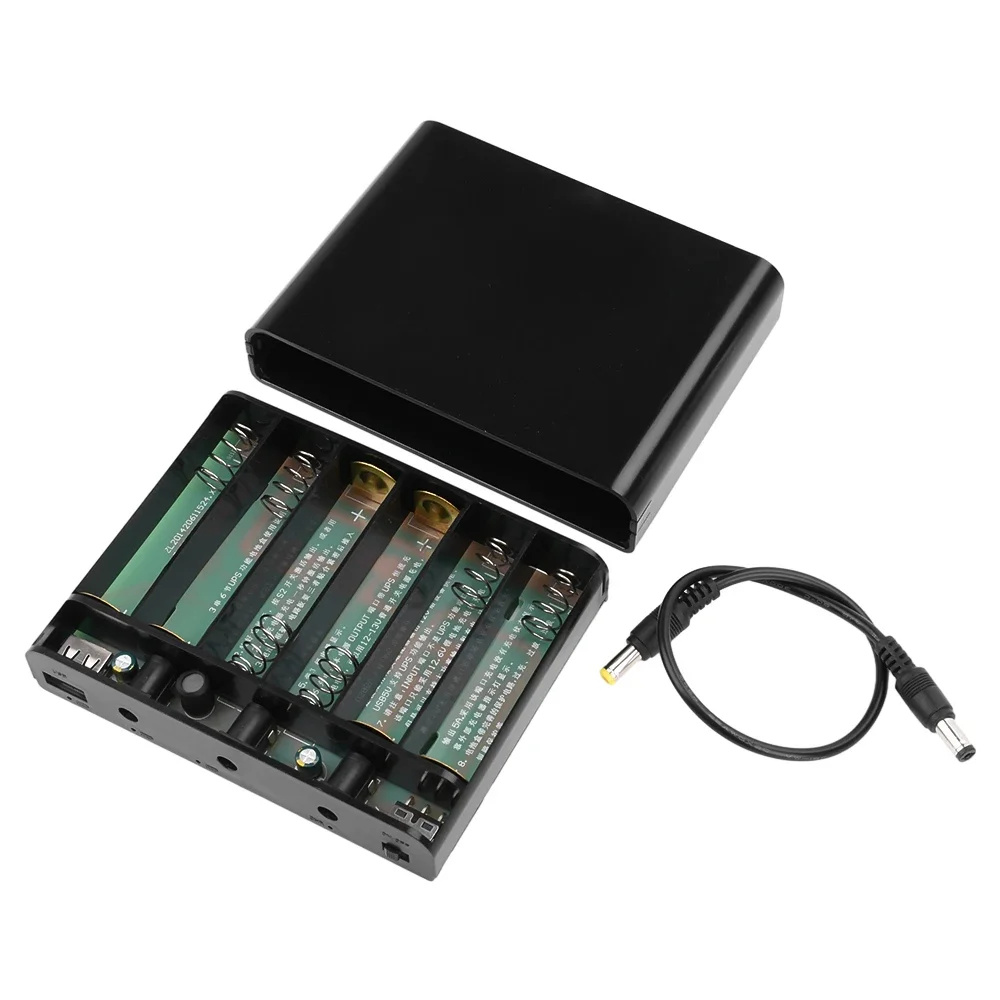


6×18650 5/9/12 V DC Mini UPS
Pros
- Three outputs at 5, 9 and 12 V
- Works as a true mini UPS
- Supports 6 18650 batteries
- Compact housing, easy to hide
- Easy installation and maintenance
Cons
- Batteries not included
- Separate 12 V charging adapter required
Introduction
Does the power go out periodically, but you need internet all the time? That's where the DC UPS 5V / 9V / 12V for 6×18650 cells comes in: a compact box that turns an ordinary router into a device that stays on. It's not just a power bank, but a full-fledged mini UPS that automatically takes over when mains power goes out.
What makes this model special is its DIY design: you install the 18650 cells yourself, decide what capacity and runtime you want, and can replace the batteries at any time without replacing the entire device.
Construction and design
The exterior couldn't be simpler: a black ABS plastic housing roughly the size of a small hard drive (125 × 93 × 25 mm). Inside is a removable holder for 6 18650 cells, which are installed like batteries in a flashlight.
On the front you'll find:
- a DC 12–13 V power connector (input);
- a 12 V output with a standard 5.5×2.1 mm connector;
- a 9 V output for ONU/optical terminals or other equipment;
- a 5 V USB port for powering small peripherals;
- a power switch and status indicators.
There's a small button on the circuit board inside — after installing the batteries, you need to press it to wake up the board and activate the outputs. It's easy to forget, leaving you staring at a router that looks like it should work but somehow doesn't.
Outputs and electronics
The DC UPS provides several fixed voltages at once:
- 12 V — the main output for routers, cameras and small switches;
- 9 V — convenient for optical terminals and some network equipment;
- 5 V (USB) — power for low-power gadgets or charging a smartphone.
According to the specifications, the board can deliver up to 2–3 A at 12 V, up to 1 A at 9 V and up to 2 A via USB at 5 V. That's more than enough to power the following at the same time:
- a typical Wi-Fi router (12 V, 0.5–1 A);
- a 9 V ONU/media converter;
- plus small peripherals via USB.
It works like a true UPS: while the 12 V input is available, the device powers connected equipment from the power adapter and charges the batteries at the same time. As soon as the power goes out — the circuit switches to battery power instantly, so the router carries on as if nothing happened.
Batteries and runtime
Inside are — 6 slots for 18650 cells. Technically, any Li-ion 18650 cells will fit, but common sense suggests:
- using cells with the same capacity and manufacturer;
- not mixing old and new batteries;
- choosing reputable brands rather than “9900 mAh for 50 ₴.”
With six 18650 cells rated at 2600–3200 mAh, the total energy comes to around 60–70 Wh. In practice, that means a router and optical terminal can run on this UPS for up to ~10 hours without mains power, depending on the power demands of the equipment.
Important: batteries and a 12 V power adapter are usually not included. You'll need to buy a 12.6 V 1.5–2 A adapter and quality 18650 cells separately.
Connections and use cases
Typical uses for this DC UPS include:
- a home or office Wi-Fi router;
- your provider's optical terminal/media converter;
- IP cameras and small surveillance systems;
- a small network switch, a NAS based on a single-board computer, etc.;
- any low-power devices running on 5, 9 or 12 V.
Setup is simple:
- Install the 18650 batteries, checking the polarity in each slot.
- Connect a 12 V adapter to the Input 12–13V input.
- Connect your devices to the appropriate 12 V/9 V/USB outputs.
- Turn on the main power switch and press the internal output enable button (once after installing the batteries).
If you don't want to push the board to its limits, it makes sense to keep the total load within 20–30 W — this helps the components last longer and keeps the batteries from getting extremely hot.
Safety and operating considerations
The board has standard protections against short circuits, battery overcharging and deep discharge, and overcurrent. This isn't an industrial UPS, but its protection is adequate for household use.
The most critical point is — battery polarity. If you insert one cell backward, it forms a “mini welding machine” with its neighbor: the spring glows red, the contact burns, and your mood takes a hit too. So:
- double-check the positive and negative terminals before snapping a cell into place;
- don't use damaged or swollen 18650 cells;
- don't leave the device on soft surfaces where it could overheat.
The housing has a 3-level battery indicator and a charging status LED: red while charging and off (or a different color) when fully charged. This gives you a rough idea of how much battery runtime remains.
Who is this DC UPS for?
This kit is a great fit if you:
- want to keep your internet running during power outages;
- are comfortable installing 18650 cells and connecting a couple of cables yourself;
- value the option of replacing the batteries rather than the entire device in the future.
It's less suitable if you want a ready-to-use solution straight out of the box: there are no batteries or charger included, and you'll need to pay close attention to polarity.
Conclusion
The DC UPS 5/9/12 V for 6×18650 cells is — a simple but very useful device for anyone who doesn't want to lose internet and surveillance cameras every time the power goes out. It's compact, offers flexible runtime depending on the batteries you install, and provides three useful output voltages at once.
Yes, you'll need to buy a good 12 V power adapter and a set of quality 18650 cells separately, and pay close attention to polarity during installation. But in return, you get a compact mini UPS that's easy to hide next to your router, so you can forget about power cuts at the worst possible moment.